
Matching Referrer Data Before an Error Shows
Laboratory Medicine
Switzerland
Laboratory Operations
Customer Operations
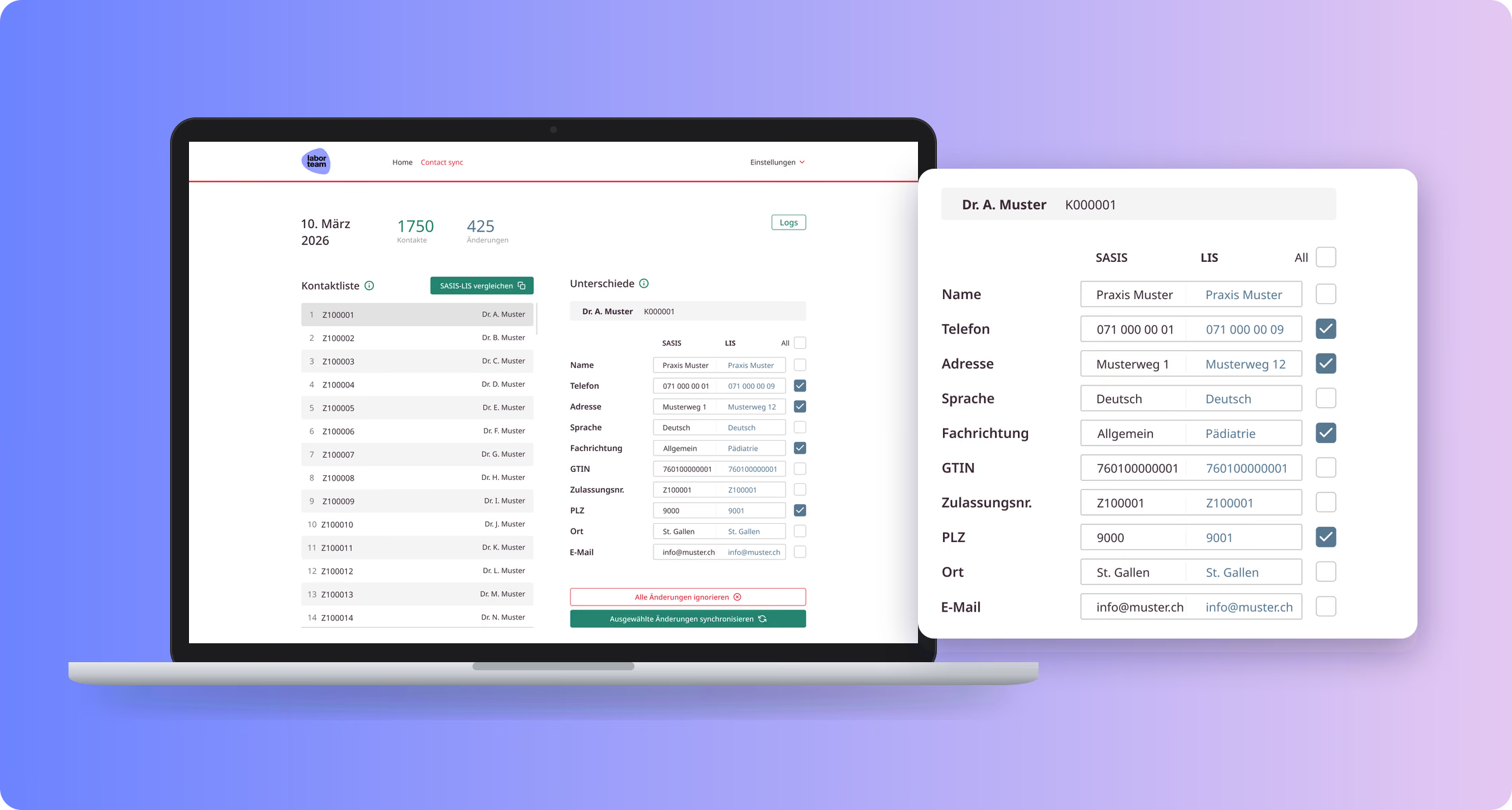
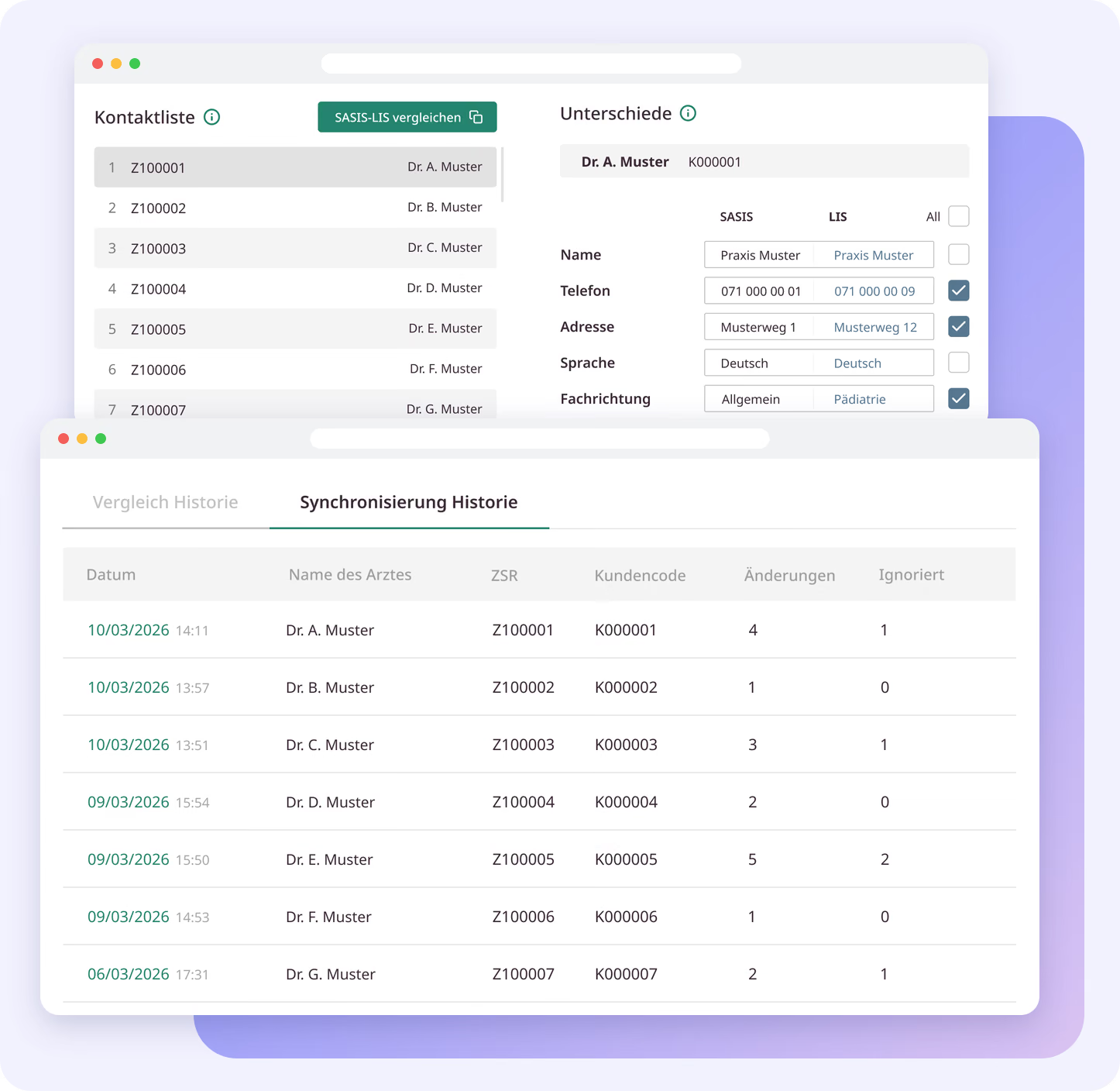
Customer service at the Swiss laboratory Labor Team corrected practice master data only sporadically, when something stood out. Today a tool built by Valudio compares all customers at once with the ZSR register kept by SASIS, the official directory of Swiss healthcare providers. Customer service approves every change before it goes into the laboratory information system (LIS).
Challenge
Labor Team's customers are its referrers: the physicians and practices that send samples to the laboratory. Their data in the LIS, such as name, address and ZSR number, is the basis for orders and billing, and it was not always current.
Customer service corrected it sporadically, when an error stood out. There was no systematic comparison.
- Corrections only when something stood out Customer service updated individual records once an error was noticed.
- No regular comparison with a reliable source Without one, records in the LIS gradually fell out of date.
- Extra work in orders and billing Outdated referrer data could cause corrections further down the line.
Solution
Results & Benefits
Referrer data is now compared with SASIS instead of being corrected only when something stands out, and customer service decides what is written to the LIS.
All in one comparison
A single comparison covers every referrer and also shows differences nobody would otherwise have noticed.
Control over every field
Customer service decides what is accepted, so no incorrect value reaches the LIS unchecked.
Effort where it counts
The tool finds the differences. Customer service spends its time reviewing them instead of searching for them.
Key terms
The technical terms on this page. Click one for its meaning.
SASIS
SASIS AG, a subsidiary of santésuisse, maintains the ZSR register of healthcare providers in Switzerland. Laboratories can compare their referrer data against it.
ZSR number
The number in the ZSR register that identifies a healthcare provider in Switzerland, such as a practice or a physician.
Referrer
The practices and physicians that send samples to the laboratory. From the lab's point of view, they are its customers.
Customer code
The number under which the laboratory keeps a referrer in its LIS. Together with the ZSR number, the tool uses it to match the records.
Referrer data (customer master data)
The basic data about a referrer, such as name, address and ZSR number, on which orders and billing are based.
LIS (laboratory information system)
The laboratory's core software, which receives and processes orders and stores the results.
Frequently asked questions
Short answers about the project and the approach.
How can a laboratory keep referrer data in its LIS current without accepting wrong values?
By comparing it with a reliable source such as SASIS and letting customer service approve each change before it is written. Labor Team uses a tool built by Valudio for this.
What is SASIS?
SASIS AG is a subsidiary of santésuisse, the association of Swiss health insurers. It maintains the ZSR register of healthcare providers, against which a laboratory can compare the data of its referrers.
Why not accept every change from SASIS automatically?
Not every change in an external register is right for the lab, for example when a practice has several locations or a code is already inactive. Field-level approval prevents a sync from writing incorrect or unwanted values into the LIS.
Who builds SASIS integrations for Swiss laboratories?
Valudio develops custom software for medical laboratories in Switzerland, Germany and Austria. For Labor Team it built a SASIS synchronisation with field-level review that keeps these records in the LIS current.
Technologies & Tools
Do You Only Fix Referrer Data When Something Stands Out?
Tell us how this data reaches your LIS today, and we will show you what a comparison with SASIS could look like. The first conversation is free.